Double Key Encryption (DKE) is a Microsoft Purview protection mode for the most sensitive files and mail in Microsoft 365. Microsoft describes it directly: DKE "uses two keys to protect data; one key in your control and a second key you store securely in Microsoft Azure," and viewing the protected data "requires access to both keys." (Microsoft Learn: Double Key Encryption)
That is the whole idea. Default Microsoft 365 encryption uses keys Microsoft operates. Customer Key lets you supply root keys, and Microsoft 365 services still decrypt content in normal operation. DKE is the mode where your key stays outside Microsoft, and Microsoft's key alone is not enough.
This page is the definition. The setup guide covers the seven deployment steps. The DKE vs Customer Key comparison is the decision between the two models.
Table of Contents
- The two keys
- What DKE covers, and what it does not
- How DuoKey holds the external key
- DKE, Customer Key, and default encryption
- When a programme actually needs DKE
- FAQ
The two keys
A sensitivity label in Microsoft Purview is what turns DKE on for a document or message. When someone applies that label in Word, Excel, PowerPoint, Outlook or Adobe Acrobat, the Office client protects the content twice:
- With your key, fetched from the DKE service you operate or mandate. With DuoKey, that key stays in the DuoKey vault and the client reaches it through your DKE endpoint.
- With Microsoft's Azure Rights Management key.
Opening the file needs both. Azure RMS checks the user's rights. The external DKE service checks the user's identity before it unwraps your key. Microsoft never holds that second key. (Microsoft Learn: Double Key Encryption, DuoKey DKE docs)
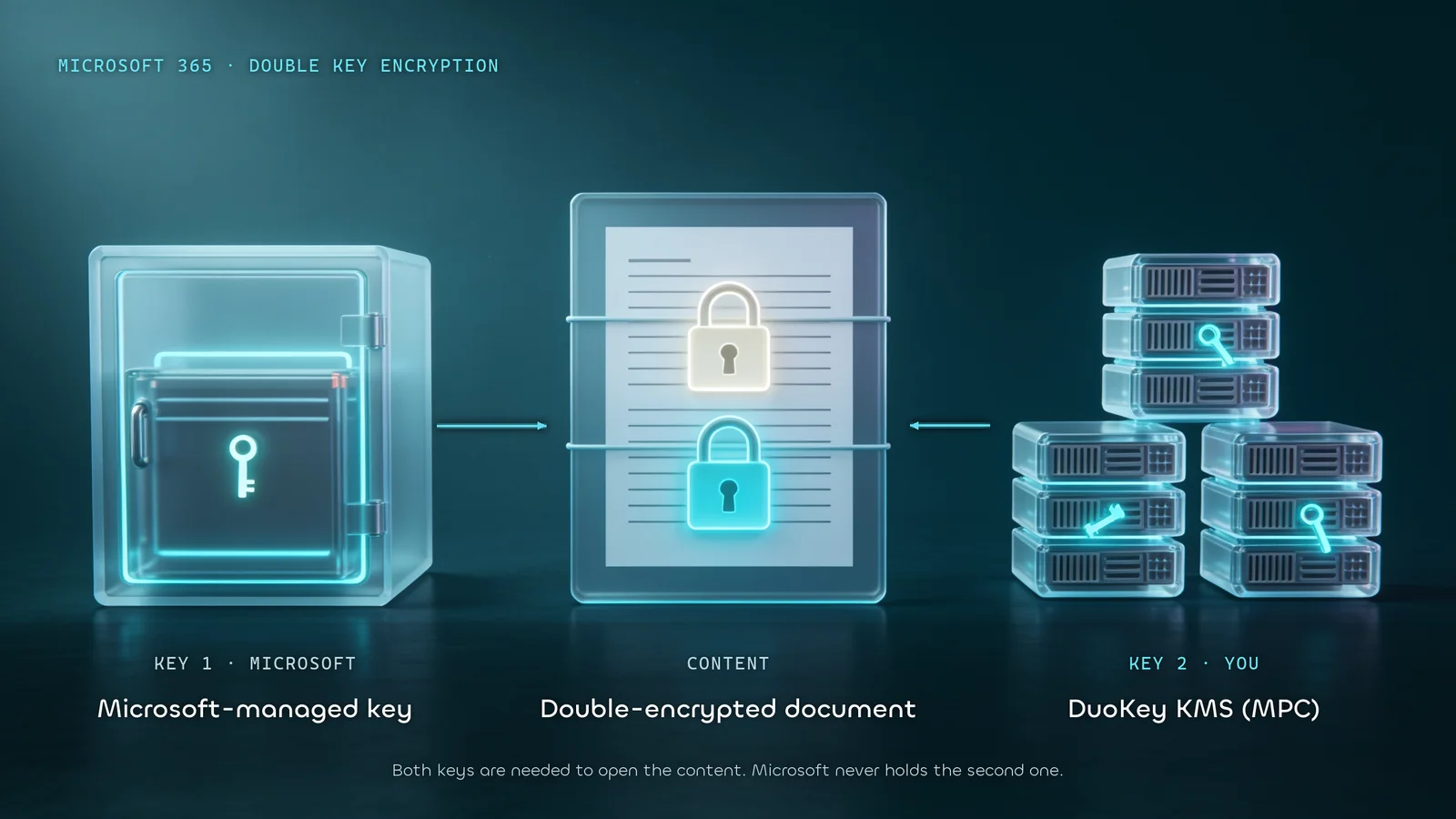
Both keys are required. Microsoft holds one in Azure RMS. The other stays in the customer key service.
Microsoft's own sample is a .NET key store you compile and host. That works as a lab. In production the host, the certificate, the availability and the access list become yours to run. DuoKey replaces that sample with a DKE endpoint deployed from DuoKey Cockpit and a key held in an MPC vault, split so no single node holds the whole key. (DuoKey: Getting started with DKE)
What DKE covers, and what it does not
Microsoft positions DKE for a small slice of content, about 5% in its own illustration, applied through sensitivity labels. It requires the Azure Rights Management service. It is included with Microsoft 365 E5. Supported clients are Microsoft 365 Apps for enterprise on Windows (Word, Excel, PowerPoint, Outlook), plus the Purview file labeler, PowerShell and the scanner. (Microsoft Learn: Double Key Encryption)
Because Microsoft cannot read the content, several Microsoft 365 features stop working on DKE-protected items:
- eDiscovery, content search and indexing
- Mail flow rules that inspect attachments, including anti-malware and spam scanning of those attachments
- Office on the web and co-authoring
- Microsoft 365 Copilot on that content
- DKE labels cannot protect Teams meetings, chat or calendar items
That list is the reason DKE is a label for M&A files, legal privilege, regulated personal data and trade secrets, and everyday collaboration stays on ordinary Purview labels. (Hold Your Own Key guide)
How DuoKey holds the external key
DuoKey is the external half of DKE:
| Piece | Where it lives |
|---|
| Microsoft's key | Azure Rights Management |
| Your DKE key | DuoKey vault. The key is split across MPC nodes, so it is never whole on one machine |
| DKE endpoint | Deployed from a Cockpit wizard. No IIS host to build |
| Who may unwrap | A Zero Trust policy in Cockpit: user, group, location, IP, time |
| Audit | GetKey and Decrypt events logged per service |
| Where it runs | Swiss-operated DuoKey, or Cockpit on-premises or on OpenShift |
The label stores the URL of your key. Rotating the key in Cockpit keeps that URL, so published labels do not have to be rebuilt. The step-by-step is the Microsoft 365 Double Key Encryption setup guide. Criteria for choosing a provider are in How to evaluate a DKE provider.
DKE, Customer Key, and default encryption
| Default Microsoft 365 encryption | Customer Key | Double Key Encryption |
|---|
| Who holds the keys | Microsoft | Root keys you supply, plus an availability key Microsoft protects | Your key and Microsoft's key, both required |
| Microsoft 365 services can read content in normal operation | Yes | Yes. You authorise that use for search, eDiscovery, anti-malware and anti-spam | No. Your key never enters Microsoft |
| How it is applied | Service-wide | Data encryption policies for Exchange, SharePoint, OneDrive, Teams, Windows 365 Cloud PCs | Sensitivity label on selected items |
| Day-to-day features | Unchanged | Unchanged | Search, web co-authoring and Copilot stop on protected items |
Customer Key is service encryption with a customer-held root. DKE is per-item encryption with an external key. Many programmes use both: Customer Key across the tenant, DKE on the labels that must stay unreadable to Microsoft. The full decision is DKE vs Microsoft 365 Customer Key. The Customer Key model itself is service encryption with Customer Key.
When a programme actually needs DKE
DKE fits when a supervisor, a public-sector rule or the board requires that Microsoft cannot decrypt a named class of content on its own. Swiss public-sector guidance is one case already written up: standard Microsoft 365 deployments can be insufficient where the provider can technically reach the decryption keys, and an architecture that keeps a decisive key outside the provider is the relevant control. (Microsoft 365 for Swiss public administration)
DKE is the wrong tool when the requirement is "encrypt the tenant and keep search, eDiscovery and Copilot." That requirement is Customer Key, or default encryption, depending on who must hold the root.
FAQ
What is double key encryption?
Microsoft Purview Double Key Encryption protects selected Microsoft 365 content with two keys. One stays in your DKE service. One stays in Microsoft Azure. Opening the content requires both. (Microsoft Learn)
What is DKE in Microsoft 365?
DKE is that same Purview feature. You turn it on with a sensitivity label that points at your key URL. It is included with Microsoft 365 E5 and applies to Microsoft 365 Apps for enterprise on Windows.
Is double key encryption the same as Customer Key?
No. Customer Key is service encryption under root keys you supply. Microsoft 365 still decrypts content for services you authorise, and each data encryption policy includes an availability key Microsoft protects. DKE keeps your key outside Microsoft, and Microsoft cannot read the protected item alone. (Customer Key overview)
Does DKE work in Outlook and SharePoint?
Desktop Outlook, Word, Excel and PowerPoint on Windows can apply and open DKE labels. Office on the web, co-authoring and Copilot do not work on DKE-protected content. Teams meetings, chat and calendar items cannot be protected with a DKE label.
Where do I start with DuoKey?
Create the key and deploy the DKE service from DuoKey Cockpit, grant admin consent, then publish the Purview label. The sequence is the setup guide. Product detail is on DuoKey for Microsoft 365.